


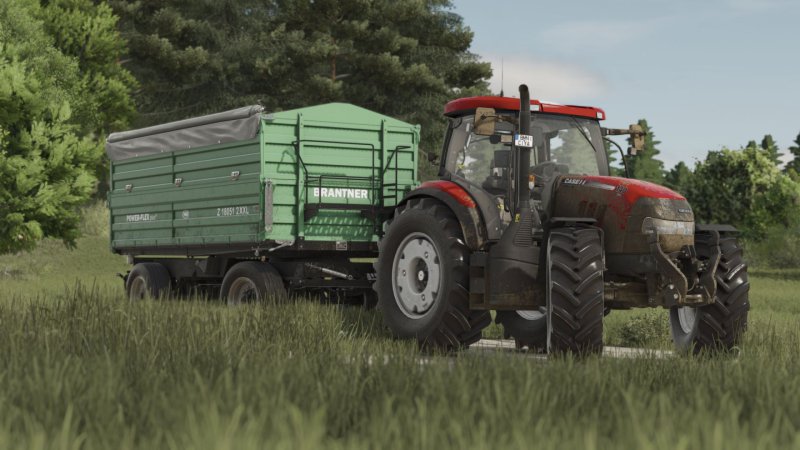
- FS25
- 06
- 03.2026
- 20:11
FS25 Shader 4 by CasiJR
|
/rating_off.png "0 votes, average: 0.00 out of 5") (0.00/5 - 0 votes) - rated (0.00/5 - 0 votes) - rated
|
Gallery

Description
FS25 Shader 4 by CasiJR
Hello guys, I come back with another shader, I hope you like it. Enjoy!!!
Instructions
1. Install Addition Game Settings mod
https://www.farming-simulator.com/mod.php?mod_id=308552
2. Install Reshade
* Pick Giants Engine 10.0.0 and DirectX10,11,12
* Install all effects
3. Go in Program Files (x86)\Steam\steamapps\common\Farming Simulator 25(in my case) and put in the x64 folder the Shader_3 by CasiJr.ini
4. Launch game and press “Home” button and select “Shader_3 by CasiJr.ini”
5. In “Additional Settings” tab change your “Custom lighting” to “Sample”. It is the first option after “off”.
Credits
Casian
Report abuse or broken download link
Similar FS25 Useful things mods
Indoor Camera Position
116 (0.00/5 - 0 votes) - rated
(0.00/5 - 0 votes) - rated 
Extended Straw Crops v1.0.0.1
163 (0.00/5 - 0 votes) - rated
(0.00/5 - 0 votes) - rated 
Extended Game Infodisplay v1.1.0.0
74 (0.00/5 - 0 votes) - rated
(0.00/5 - 0 votes) - rated 
FS25 Work Camera v1.1.0.0
97 (0.00/5 - 0 votes) - rated
(0.00/5 - 0 votes) - rated 
RealThreePointAttacher
360 (0.00/5 - 0 votes) - rated
(0.00/5 - 0 votes) - rated 
FS25 Savegame Zielonka bez modów
236 (0.00/5 - 0 votes) - rated
(0.00/5 - 0 votes) - rated 
Treway Natural Vision
265 (0.00/5 - 0 votes) - rated
(0.00/5 - 0 votes) - rated 
Animal Package Vanilla Edition v1.0.2.1
413 (0.00/5 - 0 votes) - rated
(0.00/5 - 0 votes) - rated 
Shader by Dimouss v1.0.0.2
131 (0.00/5 - 0 votes) - rated
(0.00/5 - 0 votes) - rated 
/rating_on.png "14 votes, average: 4.71 out of 5")
/rating_half.png "14 votes, average: 4.71 out of 5")




Comments to "Shader 4 by CasiJR"