



- FS25
- 13
- 05.2026
- 23:28
LS25 Saisonale Pflanzenstress v1.2.3.0
|
/rating_off.png "0 votes, average: 0,00 out of 5") (0,00/5 - 0 votes) - rated (0,00/5 - 0 votes) - rated
|
Galerie

Beschreibung
LS25 Saisonale Pflanzenstress v1.2.3.0
FS25 farms look lush even when your crops are quietly dying of thirst. This mod changes that.
Real soil moisture physics. Heat evaporates. Rain replenishes. Sandy soil drains fast; clay holds longer. When moisture drops below critical thresholds during the windows that matter most — wheat during heading, corn during pollination — stress accumulates and your yield shrinks. Place a center-pivot irrigator, schedule it, and protect what you’ve grown.
`Singleplayer` • `Multiplayer (host-authoritative)` • `Persistent saves` • `EN / DE / FR / IT / NL / PL`
QUICK START:
1. Load your farm — moisture monitoring activates immediately
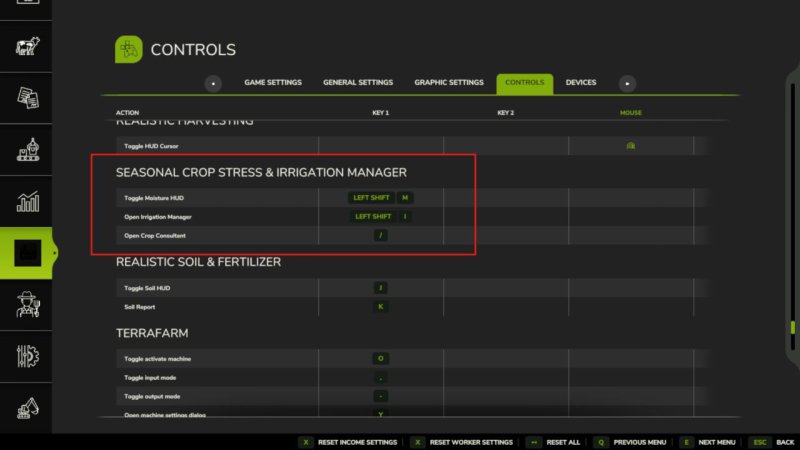
2. Press Shift+M → open the Field Moisture HUD
3. Click a field → see its 5-day moisture forecast strip
4. Press Shift+C → open the Crop Consultant for risk summary
5. Green = healthy · Yellow = needs attention · Red = irrigate NOW
6. Place a Water Pump near water, then a Center Pivot within 500m
7. Press E near the pivot (or Shift+I) → set your irrigation schedule
8. At harvest, drought-stressed fields yield less — plan ahead
Water your fields or lose your harvest.
-> https://github.com/TheCodingDad-TisonK/FS25_SeasonalCropStres
V1.2.3.0
This update fixes the long-standing issue where players on dedicated servers
saw no field data in the mod’s menus, and brings a major new way to monitor
your fields: the in-game Crop Moisture Monitor.
What’s new / what’s fixed:
• DEDICATED SERVER FIX — field moisture and stress data now syncs to all
clients when they join. The Crop Moisture Monitor no longer shows a blank
screen on dedi servers.
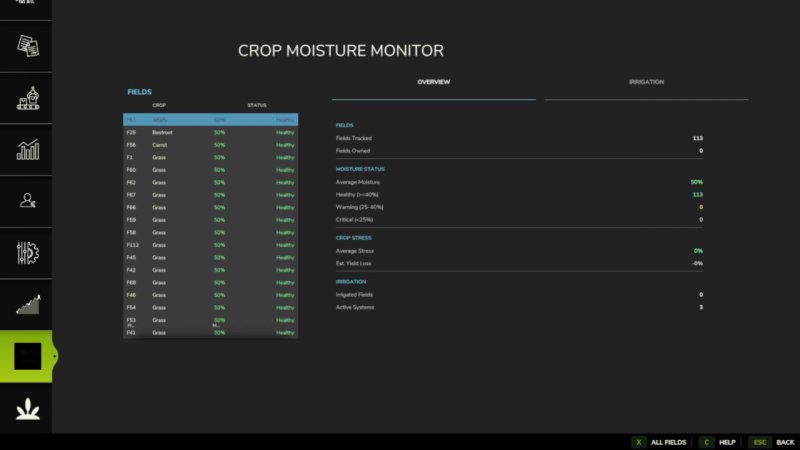
• CROP MOISTURE MONITOR — a new tab in the ESC pause menu (look for the
crop icon). Shows every field’s moisture level, stress %, and irrigation
status at a glance. Includes a farm-wide overview with average moisture,
yield loss estimate, and healthy/warning/critical counts. No more needing
to open the HUD overlay — everything is in the menu.
• IRRIGATION TAB — the monitor’s second tab lists all fields sorted by
driest first. Click any irrigated field to jump straight to its schedule
dialog.
• FIELD FILTER — toggle between all fields and only your owned fields using
the filter button in the monitor.
• MAP OVERLAY — soil moisture is now shown as a colour-coded overlay on the
in-game map (green = healthy, yellow = warning, red = critical).
• RANDOM WORLD EVENTS — if you run FS25_RandomWorldEvents, heat waves and
droughts now increase crop stress accumulation dynamically.
• ALEX CHEN — the Agronomist NPC’s relationship level now saves and loads
correctly across game restarts (requires FS25_NPCFavor).
• SETTINGS PANEL — press Shift+S to open the mod settings panel without
going into the ESC menu.
• DANISH TRANSLATION — full Danish localisation added (thanks to community
contributor West).
• Various fixes to the HUD overlay, translation files, and UI layout.
Save compatibility: no migration needed — your existing save loads normally.
V1.2.2.0
Seasonal Crop Stress now connects with Random World Events — harsh field
events make your crops more vulnerable, while good seasons give them a
break. A new Crop Moisture PDA screen and several usability fixes round
out this release.
What’s new / fixed:
– Random World Events integration: active field events now affect how fast
stress builds up — bad events (crop yield penalty, harvest penalty, etc.)
increase the stress rate by up to 40%; good events reduce it by up to 20%
– New Crop Moisture PDA screen with per-field moisture levels and a map
overlay tab showing moisture across all your fields
– Irrigation PDA: clicking an irrigated row now opens its schedule directly;
clicking a non-irrigated row shows a clear explanation
– Fixed: FarmTablet Crop Stress app now shows moisture bars correctly
(was showing „not yet available“ before this update)
– Alex Chen (agronomist consultant) relationship now persists across
save/load sessions
– Custom settings panel (Shift+S) working correctly with Soil Fertilizer
– Fixed a crash caused by an invalid map overlay draw call
– Fixed positioning warnings in the settings panel
– Ukrainian language added
– Missing translation keys filled in for all supported languages
Saves: No migration needed.
V1.2.1.0
– Removed the HUD -> We now have a page inside the pause menu :)
– Some minor bug fixes
V1.2.0.0
A lot has been added since the last release. The mod now has a proper in-game interface so you can monitor your farm’s moisture situation without relying solely on the HUD overlay.
What’s new:
• Crop Moisture tab added to the PDA map — each field shows a colour-coded dot: green (healthy), amber (getting dry), red (irrigate now)
• New Crop PDA screen in the InGameMenu — Overview tab shows average moisture, stress level, and estimated yield loss across your whole farm; Irrigation tab lists every field sorted driest-first so you can triage at a glance and see which fields already have irrigation coverage
• „Open Crop PDA“ button on the map sidebar for quick access
• Alex Chen (Agronomist NPC) now remembers your relationship level across save reloads — no more starting from scratch every session
• Custom Settings panel added (Shift+S) — adjust stress thresholds and irrigation behaviour without leaving the game
• Fixed: moisture HUD scroll, right-click, and field count display bugs
• Fixed: Shift+S keybind not showing in controls menu for all languages
• Ukrainian language support added
• FS25_SoilFertilizer integration improvements
No save migration needed — fully compatible with existing saves.
V1.1.0.1
– Center pivots and drip lines were registering 0 covered fields. The field lookup used the wrong API that returns an empty list when a placeable is placed. All systems now find the correct fields.
– Schedule activation was happening after the moisture simulation ran, so gains were always deferred to the next in-game hour. Fixed — gains now apply in the same hour the schedule activates.
– The manual button activated the system but the schedule check on the next tick would immediately deactivate it before moisture updated. „Irrigate Now“ now directly applies one hour of water to all covered fields, with immediate effect visible in the HUD.
V1.0.9.1
– Improved forecast logic: season-typical daily mean temperatures replace snapshot-temp evap (eliminates midday/dawn bias); rain duration persistence heuristic added for days 1–2; day-2 signal decay blends near-term and seasonal baseline
– Added ~ visual indicator on HUD forecast strip — header shows 5-Day Forecast ~, projected columns (D+1–D+4) render in desaturated blue-grey with ~47% format; „Now“ column shows live data unmodified
V1.0.9.0
– Added mission.cropStressManager cross-mod bridge for FarmTablet integration
– Bumped version to 1.0.9.0
V1.0.8.1
– Added cz translation
Thanks to @Kynuska for providing the translated version of the mod :)
V1.0.8.0
– Added getLocalFarmId() and isFarmlandOwnedByFarm() to CropStressManager.lua for reliable ownership checks across singleplayer and multiplayer.
– CropStressManager now re-scans for all map fields once per in-game day, ensuring newly purchased fields are correctly tracked.
– The HUD and Crop Consultant dialog now correctly filter field lists to show only owned fields, with a fallback to all tracked fields to prevent blank menus.
V1.0.7.0
– Center pivot now reconnects to a pump regardless of placement order — fixed the „pump not connected“ bug when pivot is placed before pump
V1.0.6.0
Drip irrigation lines were computing their coverage area locally on each machine, meaning clients in multiplayer could have a different coverage zone than the server — crops would dry out or be watered incorrectly for some players. This hotfix syncs the coverage data from the server to all clients.
What’s fixed:
– Drip line start/end points and coverage zone now correctly sync to all players when joining a multiplayer or dedicated server session
– Irrigation works consistently for everyone in the game
No save migration needed.
V1.0.5.0
New Features:
– Standard vehicle sprayers can now be used as manual irrigation. Fill them with WATER to boost field moisture.
– Manual watering has been balanced with a 5x effectiveness multiplier for better gameplay.
– Water applied via sprayers is fully synced with the Realistic Weather moisture system.
– Added detection for Ozz’s Moisture System mod with a warning about the Shift+M keybind conflict.
– Added a new ‚Sprayers & Watering‘ page to the Help menu.
– Updated English, German, and Dutch translations.
V1.0.3.2
## Bug Fixes
– When a field was harvested and immediately replanted, accumulated drought stress from the previous crop was incorrectly applied to the new one — silently reducing yield before a single dry hour had passed. This happened because FS25 can transition a field directly from the old fruitTypeIndex to the new one without a bare-soil tick in between.
– The modifier now tracks the last seen crop type per field. When a new crop is detected, stress resets to zero before accumulation begins. Bare-soil transitions also clear the tracker so every new planting starts clean.
**If you have saves with affected fields, stress will reset correctly on the first hourly tick after loading this update.**
## HUD showing full moisture panel while driving (HUDOverlay)
– The „Overlay disabled in vehicle“ panel was implemented but never actually rendered. The vehicle detection check relied on g_localPlayer.controlledVehicle, but in FS25, g_localPlayer is nil while driving — the player pawn is despawned when entering a vehicle. The check was always returning false.
– Vehicle detection now uses a 5-check chain with g_currentMission.controlledVehicle as the primary check (the same flag that powers the in-game speedometer), with input binding context and pawn-nil fallbacks behind it. The HUD will now correctly show the compact red panel whenever you are seated in a vehicle.
V1.0.3.1
– Added scrollwheel and row selection to the HUD overlay
V1.0.3.0
Moveable HUD, Forecast Fix & More Crops
The forecast strip was overlapping itself, and right-clicking to move another mod’s HUD was accidentally dragging this one too. Both are fixed.
The HUD can now be freely repositioned and resized.
What’s fixed:
– Forecast strip day labels and percentage bars no longer overlap each other
– Right-clicking NPCFavor or SoilFertilizer HUDs no longer affects this panel
– Settings now sync correctly to all players in multiplayer
What’s new:
– Right-click directly on the moisture panel to enter move mode, drag it anywhere on screen
– Drag any corner handle to resize the panel (60%–160% scale), position is saved between sessions
– Crop library expanded to 34 entries with corrected soil moisture absorption values
V1.0.2.0
A couple of bugs slipped through that affected multiplayer servers and NPC Favor compatibility.
This update addresses both.
What’s fixed:
– Settings changes on multiplayer servers now sync correctly to all connected players – If you don’t have admin/master rights on a server, the settings will now properly revert instead of appearing to change but doing nothing
– Fixed a conflict that prevented the Crop Consultant NPC (Alex Chen) from registering correctly when NPC Favor is installed
– Fixed cross-mod detection so NPC Favor is now reliably detected when both mods run together
No save migration needed — existing saves continue to work as normal.
Credits
Ähnlichen LS25 Nützliches Mods
Feldrechner
(0,00/5 - 0 votes) - rated 
Spurführung Beim Richtungswechsel Nicht Deaktivieren v1.1.0.0
(0,00/5 - 0 votes) - rated 
Im Frühling Starten
(0,00/5 - 0 votes) - rated 
Schneller Screenshot Modus
(0,00/5 - 0 votes) - rated 
Produktionspunkt Leasing
(0,00/5 - 0 votes) - rated 
Blitzer
(0,00/5 - 0 votes) - rated 
Shadery_FS25
/rating_on.png "1 vote, average: 1,00 out of 5") (1,00/5 - 1 votes) - rated
(1,00/5 - 1 votes) - rated 
Feldmöwen v1.0.0.1
(0,00/5 - 0 votes) - rated 
Überschüssige Tiere Verkauft
(0,00/5 - 0 votes) - rated 
/rating_half.png "14 votes, average: 4,71 out of 5")





Kommentare zu "Saisonale Pflanzenstress v1.2.3.0"