


- FS25
- 18
- 04.2026
- 11:19
FS25 BUG ModManager v3.3.1.0
|
/rating_on.png "9 votes, average: 4,25 out of 5") /rating_half.png "9 votes, average: 4,25 out of 5") (4,25/5 - 9 votes) - rated (4,25/5 - 9 votes) - rated
|
Galeria





Opis
FS25 BUG ModManager v3.3.1.0
This is not a MOD! It is a program that allows you to manage your mods before launching the game. Keep the program in a different location from the folder where your mods are stored.
Technically, it works as follows:
# Every mod contains a file named modDecs.xml. The game first reads this file and then uses the relevant instructions within it to locate the other files it needs to read. The program works on a similar principle. It first locates the modDecs.xml file inside the mod’s ZIP file. Then it retrieves the necessary information from this file and executes the corresponding functions.
I had to spend money to develop version 3.0.0.0 of the program. If you’d like to support the project, you can make a donation toward its development. The relevant section is available within the program. Thank you in advance to everyone who has shown interest.
Installation : No installation is required. Simply extract the file to a folder.
NOTE 1: Cache and other files generated when the new ModHub integration is run accumulate next to the EXE file. In versions after 3.3.0.0, simply modifying the EXE file prevents the program from rebuilding everything from scratch.
NOTE 2: Make sure you enter the correct EXE file paths when the program starts. The default paths are listed below.
NOTE 3: Starting with this version, updates and fixes will be delayed due to financial constraints. Once I have resolved my personal financial situation, the program’s development process will return to its previous pace.
Steam/Epic Paths :
SavePath : Documents\My Games\FarmingSimulator2025
ModPath : Documents\My Games\FarmingSimulator2025\mods
GamePath Steam : C:\Program Files (x86)\Steam\steamapps\common\Farming Simulator 25
GamePath Epic : C:\Program Files\Epic Games\FarmingSimulator25
Xbox Paths :
SavePath : Documents\My Games\FarmingSimulator2025
ModPath : C:\Users\[Username]\AppData\Local\Packages\GIANTSSoftware.FarmingSimulator25PC_[RandomID]\LocalCache\Local\mods
GamePath Xbox : C:\Users\[Username]\AppData\Local\Packages\GIANTSSoftware.FarmingSimulator25PC_[RandomID]\LocalCache\Local\
IMPORTANT! : I’ve tested everything, but it’s not possible for me to try every possible scenario. Therefore, if you encounter an error, please share the crash.log file created alongside the program’s EXE file and a screenshot of the error.
Contact: [email protected]
LAST NOTE : The program can run on its own, but it still includes a dependency checker. If it prompts you to install .NET 8, you can download it from the official Microsoft website.
V3.3.1.0
1. Fixed an issue where dragging a mode within the same window and dropping it back into the window would cause the mode to be deleted.
1. Fixed an error where the profile deletion process was not being saved.
1. Added missing translations for the Spanish language and made some general fixes.
V3.3.0.1
1. A fix was implemented so that the „Relocate Mods Folder” function reads the Mods Folder path in Settings.
2. A minor fix was implemented to ensure that all windows open in the center of the screen.
V3.3.0.0
1. ModHub integration has been added. You can now download and update FS25 mods from the Farming Simulator website directly within the program. Settings for enabling ModHub Manager and configuring the download process are available in the Settings window that appears when you first launch the program. If you enable it, the feature will be activated. These settings can be changed later through the Settings menu.
2. Various bug fixes and performance improvements have been maded.
3. Four potential security vulnerabilities have been addressed.
V3.2.0.0
1. RAM usage has been reduced by up to 75% at the default 50% Image Scale setting.
2. The animal capacities of Animal Transport vehicles can now be adjusted.
V3.1.0.0
1. 14 security vulnerabilities have been fixed.
2. A disclaimer has been added to the program startup screen.
V3.0.3.0
1. A critical error that occurred upon program exit has been fixed.
2. French has been added.
3. Spanish has been added.
V3.0.2.0
1. Optimization improvements have been added for scenarios involving a large number of high-resolution models. The program used to crash in such cases, but this should no longer occur.
2. The system requirements check has been expanded to account for situations that might prevent the program from opening.
V3.0.0.0
1: How to use? section was added, which explains the program in general in terms of features and usage.
2: I added a donation information section. I had to spend money for this version. If you want to support, you can donate to the development of the program.
3: The mod folder discovery system at startup was removed. Instead, a section was created where you must enter Game location, save, and mod locations. You must fill this area; otherwise, the window will not close. Also, make sure you select the locations correctly. The entire working structure of the program depends on these locations!
4: 2 new languages added: Russian and German.
5: Theme system added; there are 6 theme options in total.
6: The interface has completely changed. Now mods are loaded only visually.
7: Right-click menu added. You can perform some functions from the right-click menu. For example, add/remove mods to a profile or save file, etc.
8: The working structure of the Mod Profiles system has been improved. Also, some interface updates were made.
9: The statistics section was generally overhauled and some arrangements were made.
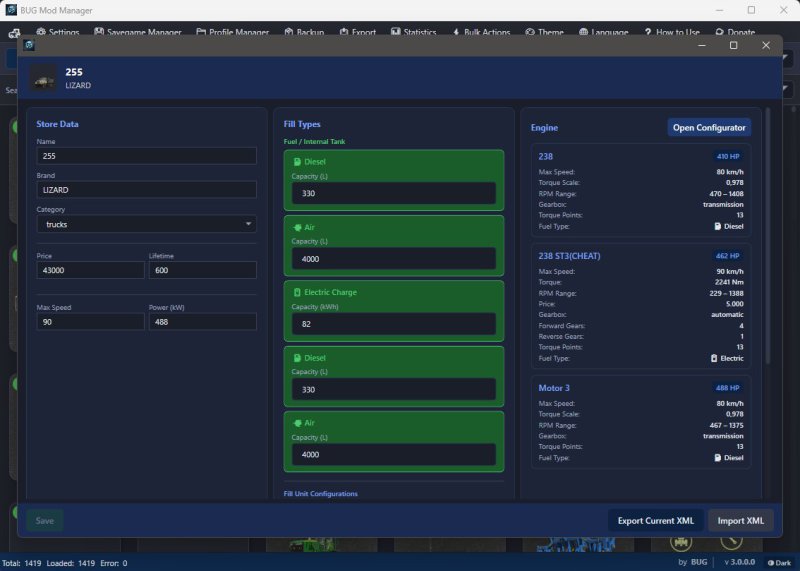
10: The Edit window was reorganized. Now the first window lists the store items content. There is a new interface that opens with a double-click for the detailed edit window. You can always take a backup of all XML content on this screen. In this window, there are 3 separate sections to update StoreData, fillable system adjustments, and Engine data in vehicles if available.
10.1: The Store Data section updates the Name, Brand, Category, Price, Lifetime, Max Speed, and Power information sections and its category in the store.
10.2: The Fill Types section updates the Liter-based Capacity, Fuel, Air, and AdBlue data of vehicles or fillable items in the XML.
10.3: The Engine section is used to update the engines of moving vehicles and is the most comprehensive part.
10.3.1: When you press the Configuration button, the readable engine data in the vehicle is read first. Engines are listed in the upper area. You can change the following information for the selected engine:
# Engine Name
# Price
# Vehicle Type (Default calculation systems change according to the vehicle type, so take care to select data suitable for the vehicle.)
# Vehicle Generation (Can decrease or increase data by a percentage as very old, standard, and new. Standard selection is the original calculation. The purpose of this data is to produce appropriate engine performance if there is a very old, very new, or fast vehicle.)
# In the Engine parameters area, you can choose whether the vehicle will use Fuel or Electricity. If you select Electric, the Electric motor type data field will open. Additionally, there is a special field for adding electric sound. If the box is checked, separate sound data is created for all engines, and the LUA code file + Sound files are written into the ZIP.
# When driving speed is entered, the calculation system calculates HP, Torque, and RPM for that speed by calculating vehicle weight + towing capacity data and default first tire data in the background. You can adjust other data such as HP, Torque, RPM, Forward/Reverse gear numbers, and vehicle acceleration coefficient using the slider.
# The maximum towing capacity field is calculated automatically. It is based on realistic data but customized to calculate up to 50% more specifically for the game. You can change it; in this case, the engine data will be updated according to that towing capacity.
# The recommended settings button was placed to automatically pull HP, Torque, and RPM data to an ideal point based on other current data.
# All calculated data can be seen in the information section below. There is also an XML preview area.
# You can add additional new engines or delete them.
# You will use the NEC button when your work is finished. Then you need to use the Save button to apply the settings. During the first save process, a backup of the original file is taken; afterwards, you will see a button next to the save button to load the original file.
11: The XML error scanning system was rewritten. It no longer sees everything as an error. Additionally, automatic fix systems were removed; it only provides detailed information. It can be ignored!
12: The Savegame Manager area was created to create a new save without entering the game. Regardless of whether it’s a game or a mod, you can select your map, make the relevant settings, add mods and DLC additions, and create a new save. I created this area to perform the loading process directly without dealing with any settings by entering the game.
V2.9.0.1
Some language translation errors have been corrected.
V2.9.0.0
# Version 1.0.1 changes:
# You can now change the “category” data for mods in the EDIT window. For example, you can move your mod from the Small Tractor category to the Medium Tractor category.
# Mod window names were not being translated during language changes; now they are displayed in the current language.
# Version 1.0.2 changes:
# The default language is now English. I should have thought globally from the start. :D
# If there are faulty modules, an additional window has been added for this, and some changes have been made to how the code works. If there are files causing ERRORS on the first read, you will now receive a warning window when the loading process is complete. Here you can see the names of the faulty files. You can now export these files to a TXT file by name, move them to a folder named ERROR_FILES, or delete these files directly. Also, when you close the window, you can reopen it by clicking on the ERROR warning area below.
# Two more buttons have been added to the mod cards. I added a “FOLDER” button to go directly to the file’s relevant folder with the selected file. Also, if desired, there is now a “DELETE” option in the main menu.
# Version 1.0.3 changes:
#Performance improvements. The application now runs faster.
#Date option added for the Sort function. Modes can now be sorted by modification date.
# Version 1.0.3.1 changes:
# Visual issue with mod cards in the main menu has been fixed.
# Version 2.0.0.0 changes:
# The main mod catalog has been changed. Now, to EDIT a mod, simply click on the relevant mod. Mods that don’t have an EDIT function have a red X in the left corner.
# There are now various functions in the top bar: Statistics, Backup, Export, and Batch Operations.
# The Statistics window displays the total number of mods, the number of active and inactive mods, the total number of items visible in the store, and the total size.
# The Statistics window has 3 main sections: how many mods are in each category, non-category mods (generally script mods), and an area where you can see the item content of all mods in the store (search function and clickable items are active).
# The backup function is useful for backing up all mods to a desired location. Similarly, there is a restore option, and both functions work comparatively (whether similar mods exist or not).
# The export option outputs all mods as TXT and JSON files, including their names, creators, versions, and sizes. You can use this to send it to someone else.
# Currently, the Bulk Operations menu only offers the function to activate or deactivate mods in bulk. More options may be added in the future based on requests.
# The search function now works more thoroughly in all fields.
# You can now only enter numbers in the Maximum Speed, Price, Lifespan, and Power sections of the EDIT window. I added this control mechanism to prevent potential accidents. Also, the Name section now allows you to change entries in different languages separately.
# I added a Refresh button next to the Load Files button. It only adds the changes to the list without completely reloading the mods.
# The program can now remember the location of the latest folder.
# Version 2.0.0.1 changes:
# Initially, searching for the default mod folder location and related processes were added.
# Version 2.9.0.0 Changes:
# An error scanning mechanism has been added to run automatically after the initial loading process is complete. If you approve, it performs a minor XML error check and, should any issues be found, identifies the problem along with the relevant file and line numbers. An automatic correction feature has been added, though it may not always function correctly; manual correction is always recommended.
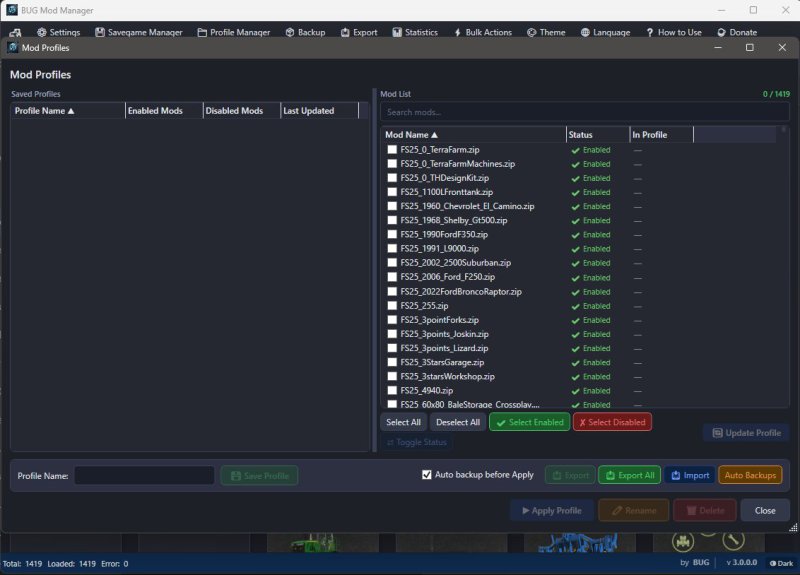
# A „Mod Profiles” option has been added. You can now save your desired mods into specific profiles and activate only those mods with a single click.
# An option to move your default mod folder to a different location has been added under „Batch Operations.” This feature utilizes symbolic links (symlinks).
# A new feature named „Image Scale” has been added to the main menu. Its purpose is to reduce RAM usage by lowering the quality (on a percentage basis) of the image files displayed within the Edit and Statistics windows. This proves beneficial—even if only slightly—when a large number of mods are installed. The default value is set to 50%.
# The Statistics window has been updated to display the item count for the „Store Items Gallery.” Additionally, a new section titled „Hidden Store Items” has been added to the left-hand menu to list mods that are either invisible or currently lack content; this feature is provided for informational purposes only.
# The Edit window now displays the item count specific to each individual mod.
# New options have been added to the sorting functions.
# The issue with the expanding list in the „Restore Backups” menu has been resolved.
# General performance and security improvements have been implemented.
V2.0.0.1
# Initially, searching for the default mod folder location and related processes were added.
V2.0.0.0
# The main mod catalog has been changed. Now, to EDIT a mod, simply click on the relevant mod. Mods that don’t have an EDIT function have a red X in the left corner.
# There are now various functions in the top bar: Statistics, Backup, Export, and Batch Operations.
# The Statistics window displays the total number of mods, the number of active and inactive mods, the total number of items visible in the store, and the total size.
# The Statistics window has 3 main sections: how many mods are in each category, non-category mods (generally script mods), and an area where you can see the item content of all mods in the store (search function and clickable items are active).
# The backup function is useful for backing up all mods to a desired location. Similarly, there is a restore option, and both functions work comparatively (whether similar mods exist or not).
# The export option outputs all mods as TXT and JSON files, including their names, creators, versions, and sizes. You can use this to send it to someone else.
# Currently, the Bulk Operations menu only offers the function to activate or deactivate mods in bulk. More options may be added in the future based on requests.
# The search function now works more thoroughly in all fields.
# You can now only enter numbers in the Maximum Speed, Price, Lifespan, and Power sections of the EDIT window. I added this control mechanism to prevent potential accidents. Also, the Name section now allows you to change entries in different languages separately.
# I added a Refresh button next to the Load Files button. It only adds the changes to the list without completely reloading the mods.
# The program can now remember the location of the latest folder.
V1.0.3.1
# Version 1.0.1 changes:
# You can now change the “category” data for mods in the EDIT window. For example, you can move your mod from the Small Tractor category to the Medium Tractor category.
# Mod window names were not being translated during language changes; now they are displayed in the current language.
# Version 1.0.2 changes:
# The default language is now English. I should have thought globally from the start. :D
# If there are faulty modules, an additional window has been added for this, and some changes have been made to how the code works. If there are files causing ERRORS on the first read, you will now receive a warning window when the loading process is complete. Here you can see the names of the faulty files. You can now export these files to a TXT file by name, move them to a folder named ERROR_FILES, or delete these files directly. Also, when you close the window, you can reopen it by clicking on the ERROR warning area below.
# Two more buttons have been added to the mod cards. I added a “FOLDER” button to go directly to the file’s relevant folder with the selected file. Also, if desired, there is now a “DELETE” option in the main menu.
# Version 1.0.3 changes:
#Performance improvements. The application now runs faster.
#Date option added for the Sort function. Modes can now be sorted by modification date.
# Version 1.0.3.1 changes:
# Visual issue with mod cards in the main menu has been fixed.
Autorzy
BUG05
Podobne mody FS25 Inne dodatki

Shader Pics by betonMisha
/rating_off.png "0 votes, average: 0,00 out of 5") (0,00/5 - 0 votes) - rated
(0,00/5 - 0 votes) - rated 
Real Vehicle Breakdowns v0.9.2.1
(0,00/5 - 0 votes) - rated 
John Deere Deer (Prefab)
(0,00/5 - 0 votes) - rated 
Info Display Extension v1.2.2.0
(5,00/5 - 1 votes) - rated 
Spawner złomu V1.0.1.0
(0,00/5 - 0 votes) - rated 
Ulepszony wybór kolorów v1.1.0.0
(0,00/5 - 0 votes) - rated 
Shadery FS25 by Maciekk
(5,00/5 - 2 votes) - rated 
Real GPS Mod v1.2.0.0
(0,00/5 - 0 votes) - rated 
Adjusted Fruits (Prefab)
(0,00/5 - 0 votes) - rated 





nie głupie rozwiązanie ale troche trudne do ogarnięcia aby sie tym obsłużyć oraz trzeba popracować nad optymalizacją jak twórca pisał
the program crashes due to the number of mods I have and the size of the mods folder